SAP Concur
- 4.6
- Rating
- 5.00M
- Installs
- Free
- Price

 Analysis by App-foxy
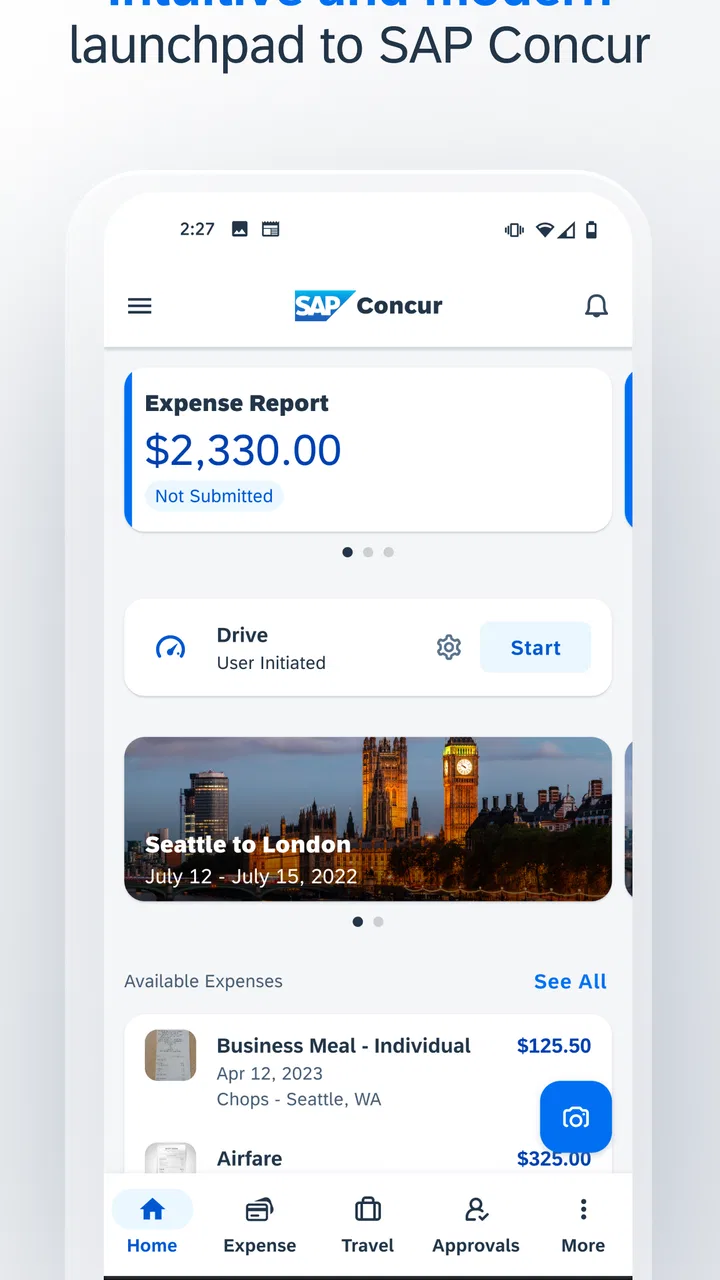
When I first opened SAP Concur, I understood its purpose quickly: it is a business app for keeping travel and expense tasks together while I am away from my desk. That sounds simple, but the real value appears when a work trip produces several receipts, changing plans, and a deadline for submitting everything. Instead of treating each receipt as a separate problem, I can use one place to organize the information and keep the expense process moving.
The app is free and comes from SAP SE, a developer best known for business software rather than casual mobile tools. That background matters because this is not designed as a personal budgeting app. It is built around work-related travel and expenses, so the experience makes the most sense when an employer, team, or organization already uses the Concur system. For an individual who only wants to track household spending, it will feel more specialized than necessary.
Its audience is broad enough to include employees, managers, frequent travelers, and people who only travel occasionally but dislike returning from a trip with a pocket full of receipts. The Everyone age rating also makes it approachable from an age-classification standpoint, although the actual usefulness depends far more on whether your workplace supports the service and how your company has configured its processes.
You May Also Like

 Blood Strike: 2.5 Anniversary
Blood Strike’s Loadouts Turn Every Drop Into a Tactical Gamble
A close look at Blood Strike’s custom loadouts: how fast access to signature weapons reshapes its battle royale rhythm, rewards preparation, and narrows the gap between fights.

 Pandora - Music & Podcasts
Pandora’s Music Is Easy to Start, but Harder to Recover
Pandora’s strength is its low-effort path from a seed to a station. Its weak spot is how much confidence it asks you to place in connection, setup, and quiet recovery.

 8 Ball Pool
 Is Built on Rivalries, Rematches, and Routine
A close look at the rivalries, rematches, shared routines, and unanswered safety questions that turn a quick pool match into a persistent mobile community.

 Samsung Music
’s Quiet Strength Is Playing What You Already Own
Its reach comes less from spectacle than from dependable access to a personal library. That simplicity is both the app’s strongest retention engine and its ceiling.

 AccuWeather: Weather Radar
AccuWeather Review: A Quick, Clear Forecast for Everyday Decisions
For everyday plans, the best forecast is the one you can understand quickly. AccuWeather makes rain timing, radar, and local conditions easy to act on, with a few trade-offs.

 Hill Climb Racing
Why Hill Climb Racing Still Turns Crashes Into One More Run
A tiny car, a bumpy hill and one more upgrade: Hill Climb Racing keeps resurfacing because its simple chaos makes every near-miss feel personal.
More From Our News Desk



Getting from installation to a useful first result
I focus here on the first-use path: how to turn a new installation into one properly documented expense, rather than trying to learn every part of a business system at once. Starting with a single real purchase lets me check that I’m in the right work account and understand what my organization expects before a trip gets busy. Next, I look at the small setup choices that make that first result easier to complete.
What the mobile experience is really for
I would not install this expecting a full replacement for every desktop task connected with corporate travel. The mobile experience is strongest when I need to capture or review information at the moment it happens. A receipt is easier to deal with immediately after lunch than several days later, when I may no longer remember the business purpose or which project should receive the charge.
That timing is the first important insight. The app is not merely a smaller version of an office expense system; it changes the best workflow. I can handle small pieces while traveling, then return to the larger report when I have time. This reduces the familiar end-of-trip scramble, but only if I make a habit of recording items as they occur.
The app has attracted a substantial audience, with more than five million installs and an average rating of 4.5 from roughly one hundred twenty thousand ratings. Those figures suggest that it is established enough to be familiar to many business travelers, but they should not be mistaken for a guarantee that it will fit every company’s setup. Enterprise software can feel smooth for one organization and restrictive for another because approval rules and available options are often controlled outside the phone.
What to prepare before opening it
Before I begin, I would keep my work login details nearby and make sure I know which organization account I am expected to use. A common first-time mistake is approaching the app like a standalone consumer service, then wondering why the sign-in path or available actions do not look like a normal personal finance app. The important question is not only “Can I install it?” but also “Which company environment should I enter?”
I would also decide what success means for the first session. Trying to configure an entire travel history at once is a poor introduction. A better target is one current business expense or one piece of travel information that I can finish properly. That gives me a quick test of whether my account is active, whether the relevant workflow is available, and whether my company expects additional details.
The version listed for the app is 10.29.0, and it supports operating systems from version 9 onward. That makes it accessible on many older compatible devices, although I would still keep the phone’s operating system and the app itself reasonably current. Business apps can depend on account services and security changes, so an outdated installation may create avoidable friction even when the device technically meets the minimum requirement.
The first setup decisions that matter
Once signed in, I would spend a few minutes learning the labels used by my organization instead of tapping through screens without reading them. Expense categories, report names, cost centers, project references, and approval destinations can all affect whether an item is ready for submission. The exact choices are not universal, so I would follow the terminology used by my employer rather than guessing based on personal finance habits.
This is where the app can feel less intuitive than a basic notes tool. A note only needs to make sense to me. An expense record may need to make sense to an approver, an accounting team, and a company policy at the same time. If the app asks for a business reason or allocation, I would complete it while the context is fresh rather than leaving a vague reminder for later.
Another practical tip is to test the smallest complete workflow before a major trip. I would create or capture one legitimate work expense, check that the details are correct, and see what the next action is. This is more useful than browsing every menu because it reveals the route I will actually use: record, review, add context, and submit or save for later.
My recommended first successful action
For a first meaningful result, I would start with a receipt from a recent business purchase that I can still explain clearly. I would record the amount and date carefully, attach or capture the supporting receipt if the workflow presents that option, then add the work-related context before moving on. The goal is not simply to make an entry appear; it is to produce an item that would be understandable to someone reviewing it.
A realistic example would be a train journey to a client meeting. Immediately after paying, I would use the app to preserve the receipt and identify the reason for the trip. Later, when I am back at the hotel, I could check whether the item belongs in an existing report or should remain available for the next report. The benefit is small in the moment but significant at the end of the week: I am no longer trying to reconstruct the journey from memory.
The best first win is a complete, reviewable expense—not merely a saved receipt. That distinction helps prevent a common disappointment. Capturing information is only one stage. A successful workflow also includes the details needed for classification and the next step expected by the organization.
I would then review the entry as if I were the person approving it. Is the date plausible? Is the business purpose clear? Does the amount match the receipt? Is the item attached to the right trip, report, or work context? This short self-check is one of the most useful habits I found because it catches confusion before the expense reaches someone else’s queue.
Where new users commonly get confused
The first source of confusion is the difference between a personal action and a company-controlled action. I may be able to create or edit an expense, but whether I can submit it, change a category, or move it through approval can depend on the account configuration. If a button is missing, that does not automatically mean the app is broken; it may mean the organization has assigned a different role or workflow.
The second is the difference between travel planning and expense reporting. These tasks are related, but they are not identical. A trip can generate expenses, yet an expense record still needs its own accurate details. I would avoid assuming that entering one automatically completes the other. Treating them as separate checkpoints makes it easier to see what still needs attention.
The third is the temptation to postpone all explanation until the end. That approach is especially risky for meals, local transport, and small purchases that blend together during a busy trip. I find it more reliable to add the reason and relevant context immediately, while I still know who the expense was for and why it happened.
There can also be a difference between what looks convenient on a phone and what is comfortable for a long report. Mobile entry is excellent for short, timely actions. Reviewing many lines, checking several allocations, or correcting a complicated report may be easier on the organization’s broader Concur environment if that is available to me. I see the app as a companion for momentum, not a reason to force every detailed accounting task onto a small screen.
How it compares with simpler alternatives
A camera app plus a notes document may be faster for storing a receipt, and a spreadsheet can be more flexible for someone managing personal spending. Those alternatives are useful when the only goal is remembering what was paid. They become less suitable when the information must follow a structured business process and reach other people for review.
Compared with a general expense tracker, SAP Concur feels more formal and less personal. That is a strength for employees whose organizations already use it, because the record is intended to fit a work process rather than remain a private list. It is also a weakness for freelancers or individuals who want complete freedom to design their own categories and reporting habits.
Compared with waiting until I return to a laptop, the mobile app wins on timing. I can deal with evidence and context close to the event instead of relying on memory. The trade-off is that I need to understand the company’s vocabulary and workflow. A simple spreadsheet may let me improvise, while this app asks me to fit the expense into a defined structure.
That makes the choice fairly clear. I would recommend it to someone whose employer already relies on Concur and who travels or submits expenses often enough to benefit from immediate capture. I would skip it as a first choice for household budgeting, informal shared spending, or a tiny operation that has no need for an approval-oriented system.
Small habits that make the app more effective
My first habit would be to record expenses at natural stopping points rather than waiting for the end of the day. After a meal, at the station, or when returning to a hotel are good moments because the receipt and context are still together. This is less about speed than accuracy: the sooner I complete the identifying details, the less likely I am to create an entry that needs explanation later.
My second habit would be to separate “captured” from “ready.” I would periodically review unfinished items and ask whether each one has enough context for another person to understand it. This two-stage approach is useful when I am busy: I can preserve the evidence first, then complete the review when I have a quiet moment without pretending that the item is already finished.
My third tip is to learn the organization-specific exceptions early. Some expenses may require special treatment, and some trips may use different reporting expectations. I would look at an accepted previous report or ask the internal person responsible for expenses to explain the local rules. No mobile interface can replace that knowledge, and guessing is more costly than spending a few minutes learning the pattern.
For frequent travelers, I would also use the app as a memory aid rather than a last-minute filing cabinet. The phone is with me when the event happens, which gives it an advantage over a desktop workflow that I only open afterward. For occasional travelers, the same principle still works, but I would do a short practice entry before leaving so the first real receipt is not also my first attempt to understand the system.
When the friction is worth accepting
The app’s main limitation is not that it lacks a purpose; it is that the purpose is structured. I cannot judge it fairly by the standards of a lightweight note-taking app. The extra fields and workflow steps are there because a business expense has consequences beyond my own memory. Still, those steps can feel slow when I have a simple, low-value purchase and just want to move on.
There is also a learning curve around organizational language. A first-time user may know exactly what was purchased but not which internal category or work reference should be selected. That is a process problem as much as an interface problem. My practical response would be to avoid inventing an answer. Save the accurate basic information, then resolve the classification using the company’s guidance.
I would be cautious about relying on it as the only place where I remember an important deadline or policy. The app can support the reporting workflow, but my employer’s rules still determine what is acceptable and when it must be submitted. A well-recorded expense can still need correction if it does not meet a local requirement, so I would treat the app and the policy as two parts of the same routine.
Who should install it first
I think SAP Concur is a strong fit for an employee who has been told to use Concur for business travel or expenses, especially someone who regularly handles receipts away from a desk. Its large user base and 19K reviews show that it is not an obscure experiment, and the free price removes an obvious barrier to trying the mobile workflow.
I would also recommend it to occasional travelers who are tired of reconstructing expenses after returning home. The benefit does not require constant travel; one well-managed trip can demonstrate why immediate capture is useful. The key is to begin with a single complete item and learn the organization’s expectations before attempting a large report.
I would not make it my first recommendation for a person who only needs a private spending diary. A general finance app or spreadsheet may be quicker, more customizable, and easier to understand without an employer account. I would also hesitate if my workplace has not explained how Concur is used, because the app cannot tell me which internal choices are correct for my situation.
My final take after using the workflow
SAP Concur works best when I treat it as a bridge between real-world travel and a formal business process. Its strongest moment is right after an expense happens, when I can preserve the receipt and the reason together. Its weaker moment is when I expect it to behave like a completely independent personal finance tool or when I try to complete a complex report without understanding the company rules.
The app was released in June 2010, and its current version is 10.29.0, so it represents a mature product rather than a brand-new idea. That maturity is useful for a business audience, but it also means the experience is shaped by established workflows instead of being relentlessly minimal. I appreciate that trade-off when accuracy and review matter more than shaving every step from the process.
My advice to a first-time user is straightforward: install it, sign in with the correct work account, complete one genuine expense from start to finish, and inspect what remains before your next trip. Do not wait until a crowded airport or the final evening of a business journey to discover how your organization expects reports to be organized. Once the basic rhythm becomes familiar, the app can turn expense administration from a memory exercise into a series of small actions I can finish while the details are still fresh.
For the right workplace, that is a worthwhile improvement. For someone outside that environment, the structure may be unnecessary. I would choose it confidently when my employer already uses SAP Concur and I want a practical mobile companion for travel and expenses; otherwise, I would first compare the organization’s needs with a simpler personal tracker before committing to this more formal approach.
FAQs for SAP Concur
01What is SAP Concur used for?
SAP Concur is a travel and expense management app that helps businesses streamline their expense reporting process. It allows users to easily capture and submit receipts, track expenses, and manage travel itineraries all in one place. This helps organizations improve compliance, reduce costs, and enhance visibility into spending.
02Is SAP Concur available for both Android and iOS?
Yes, SAP Concur is available for both Android and iOS devices. Users can download the app from the Google Play Store for Android devices and the App Store for iOS devices. The app offers a consistent user experience across platforms, making it easy to manage expenses on the go.
03How secure is SAP Concur for handling sensitive financial data?
SAP Concur takes data security seriously and implements robust security measures to protect sensitive financial information. The app uses encryption protocols to safeguard data transmission and storage. Additionally, it complies with industry standards and regulations, ensuring that users’ data is handled with the highest level of security.
04Can SAP Concur integrate with other business systems?
Yes, SAP Concur offers integration capabilities with various business systems such as ERP, CRM, and accounting software. This allows for seamless data flow between systems, enhancing productivity and accuracy. Integrations help businesses automate processes and improve overall operational efficiency by reducing manual data entry.
05Does SAP Concur support multiple currencies and languages?
SAP Concur supports multiple currencies and languages, making it suitable for global businesses. Users can submit expenses in different currencies, and the app will automatically convert them based on the current exchange rates. Additionally, the app is available in various languages, catering to diverse user bases worldwide.
Pros
- Seamless expense tracking.
- User-friendly interface.
- Integrated travel booking.
- Real-time expense updates.
- Comprehensive reporting tools.
Cons
- Occasional sync issues.
- Limited offline capabilities.
- Complex setup process.
- Higher cost for small businesses.
- Requires regular updates.

SAP Concur
Gallery